
Task Overview
A Task is a single piece of work that needs to get done: it has a name, a person or team responsible for it, and a due date. Tasks can belong to a project or lead, or stand on their own. Some you create yourself; many are created for you automatically by Notifications and by project Workflows.
Why it helps. Tasks give every job a visible, dated to-do list that everyone on the team can see. The person assigned is notified the moment a task lands on them, overdue work surfaces automatically in Reminders, on the dashboard, and on the Tasks page, and Workflow tasks stop a milestone from advancing until the work is actually done. Task notes keep a running history of extensions, reassignments, and completion, so nothing depends on memory.
Typical tasks:
- Get color choices from customer
- Pick up check
- Pick up excess materials
- Email estimate to homeowner
- Let homeowner know the inspection has been scheduled
Quick start
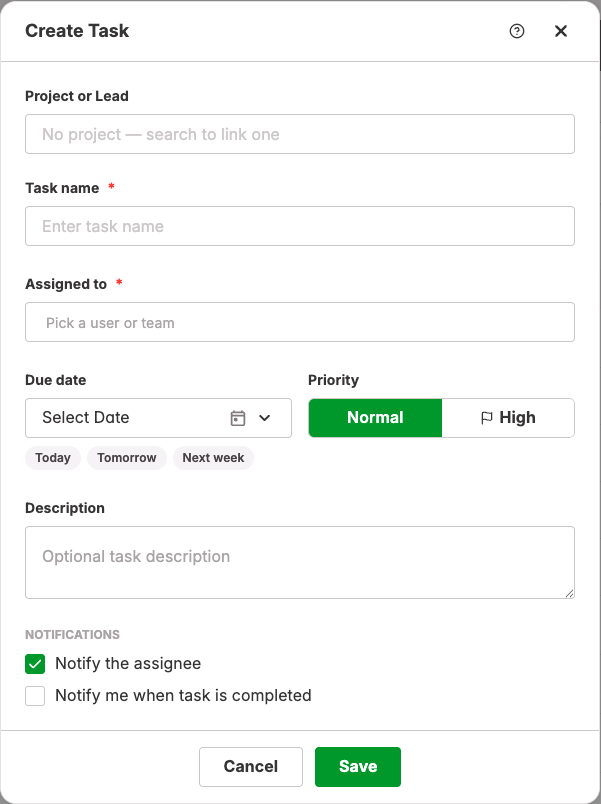
- Open Activity → Tasks from the main menu, or open a project and choose Workflow → Tasks. Click the green + button.
- Choose the Project or Lead the task belongs to. Skip it for a standalone task. When you start from a project, it is already filled in.
- Enter a Task name and pick who it is Assigned to: a user, or a team if your company allows team tasks.
- Set a Due date. The Today, Tomorrow, and Next week shortcuts save a click.
- Leave Priority on Normal or switch it to High, and add a Description if the name alone is not enough.
- Leave Notify the assignee checked so they hear about it right away. Check Notify me when task is completed if you want to know when it is done.
- Click Save. When the work is finished, open the task and click Mark complete.
Where Tasks come from
Tasks you create
Anyone can create a task from the Tasks page, from a project's Workflow → Tasks page, or from the Add Task button on the User Tasks dashboard widget. Manual tasks fill the gaps between what your Workflows and Notifications generate.
Tasks created by Notifications
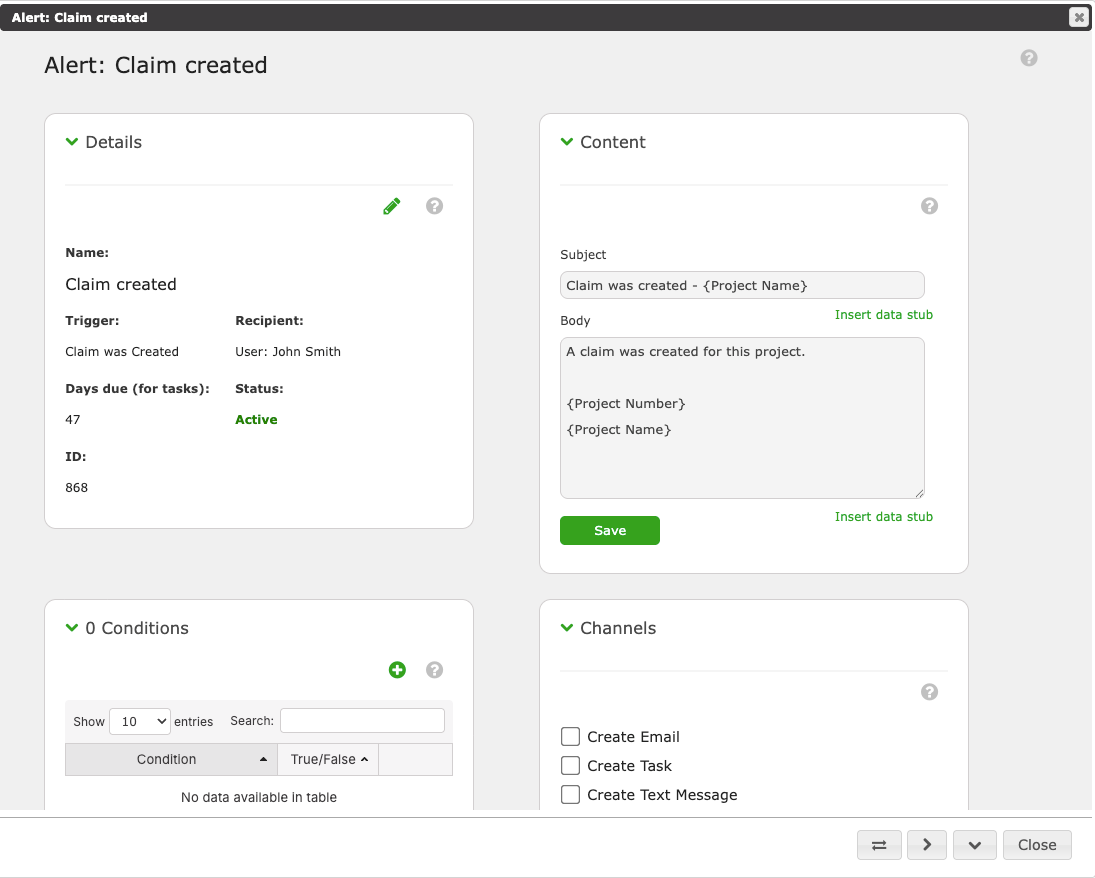
A Notification (set up under Company Settings → Custom Alerts) says "when this specific thing happens, tell these people." Open the Notification and, under Channels, check Create Task: every time it fires it will also create a task for the Recipient. Tasks created this way are always High priority, and the Days due (for tasks) value in the Notification's Details sets how many days after the event the task is due.
Tasks created by Workflows
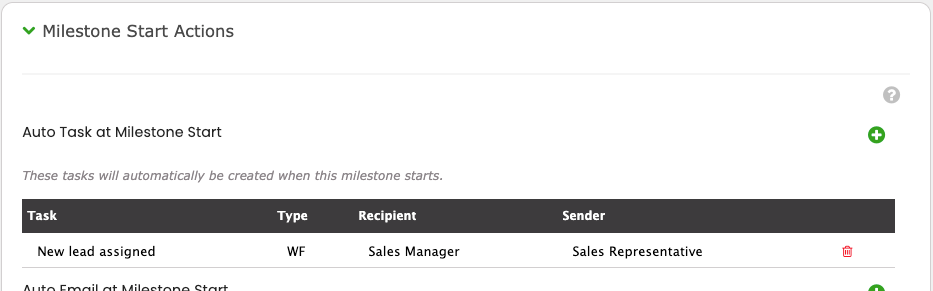
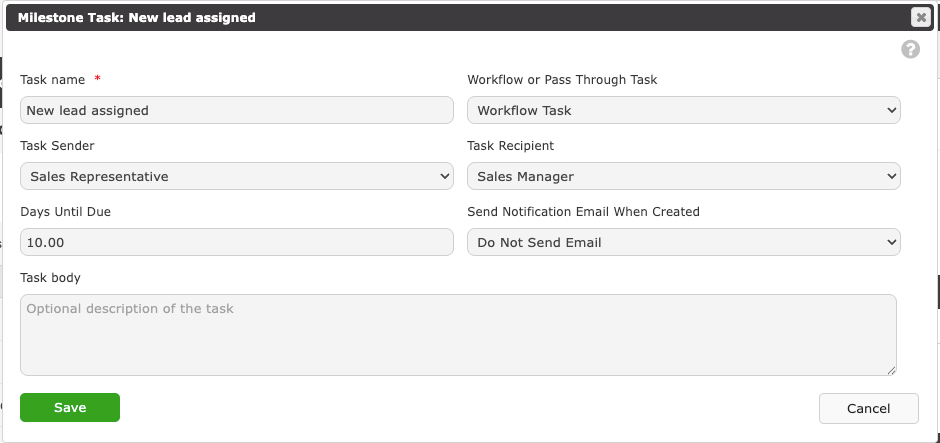
Each milestone in a Company Workflow can carry one or more task templates, listed under Milestone Start Actions → Auto Task at Milestone Start in the milestone's settings (Company Settings → Workflows). When the milestone becomes active on a project, each template becomes a real task: the Task Recipient is a project role (such as Sales Manager) or a team, so the task lands on whoever holds that role on that project, and it is due the template's Days Until Due later. The template's Workflow or Pass Through Task setting makes it one of three kinds:
- Workflow Task — the milestone cannot complete until this task is completed or bypassed.
- Pass Through – Do Not Hold Up Workflow — the task is created, but the milestone can move on without it.
- Pass Through – Auto Close on Milestone Completion — the task closes itself when the milestone completes.
See Workflow tasks below for the rules that apply once these tasks exist.
Anatomy of a Task
| Field | What it does |
| Project or Lead | The project or lead the task belongs to. Optional. Locked when the task was created from a project. |
| Task name | Required. Keep it short and action-first: "Pick up check", not "Check". |
| Assigned to | Required. A user, or a team when Allow team tasks is on for your company. Only active users and teams are offered. |
| Due date | When the work is due. A task past its due date and not complete shows as Overdue. |
| Priority | Normal or High. High tasks carry a flag in every list and can be filtered on. |
| Description | Free text for the details the name does not carry. |
| Notify the assignee | On by default. Sends the assignee an in-app notification when the task is created. |
| Notify me when task is completed | Off by default. Notifies you, the creator, when the assignee marks the task complete. |
| NOTES | The task's running history, shown on existing tasks. You add notes with the +; changes to the task are logged here automatically. |
A task is always in one of three states, shown as a badge on the task and as the Status column: Active, Overdue (active and past its due date), or Completed.
Where you see Tasks
The Tasks page
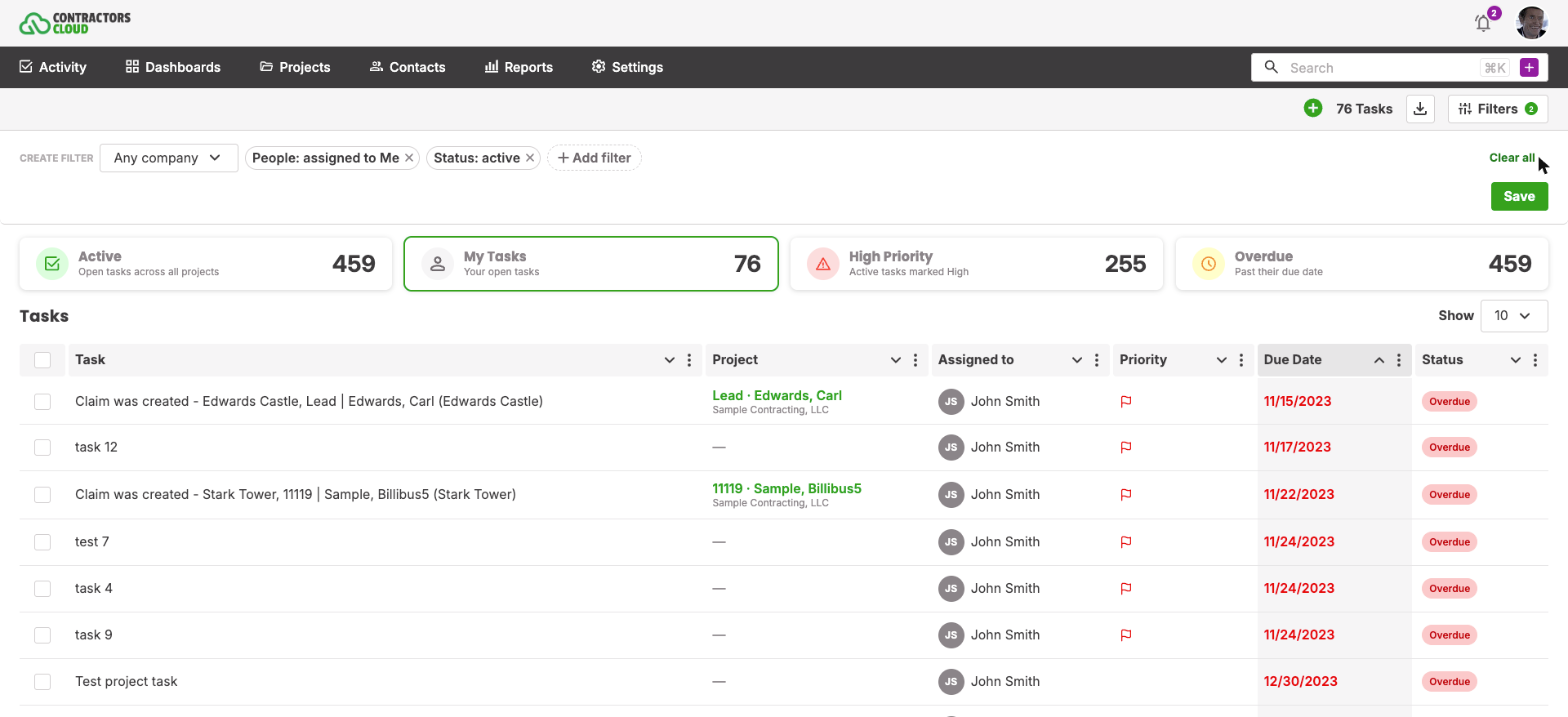
The Tasks page (Activity → Tasks) is the full list. Four counters sit above it, Active, My Tasks, High Priority, and Overdue; click one to filter to it. The Filters button opens a tray with four QUICK VIEWS, My tasks, Team tasks, This week, and Completed, which apply a ready-made set of filters in one click.
Filters. In the same tray, under CREATE FILTER, pick a company if you work across several, then click + Add filter to narrow the list by:
- People — Assigned to, Created by, or Completed by, each with Me, My team, Only team tasks, Only user tasks, or a specific user or team.
- Task type — Workflow, Project, or Non-project.
- Project status (available once a Task type of Project is set), and Workflow and Event (available once a company is chosen).
- Status (Active, Completed, Overdue) and Priority (Normal, High).
- Dates — Due date, Creation date, Completed date, and Last update, each with ready-made windows such as Today, This week, Next 2 weeks, Last month, or a custom range.
Active filters appear as chips you can remove one at a time, or all at once with Clear all. Click Save in the Filters tray to keep the filters, columns, and sort you use most as your default view, and the page opens that way next time.
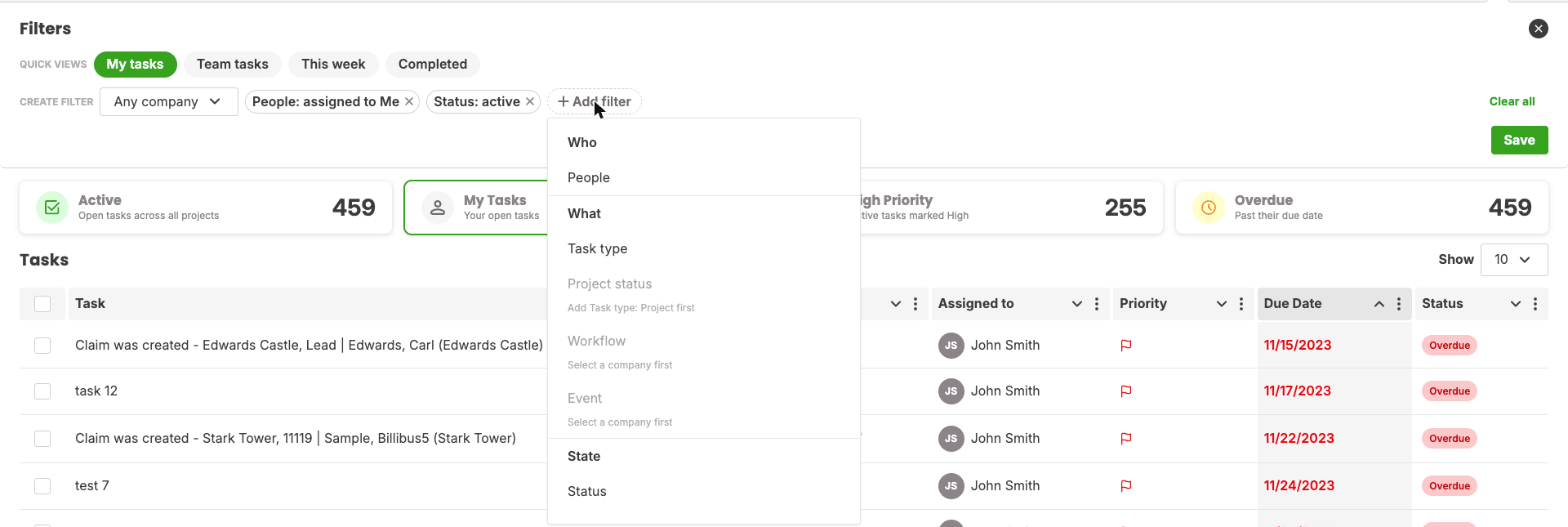
Columns. The list shows Task, Project, Assigned to, Priority, Due Date, and Status by default. Add, remove, and reorder columns from the column picker: Created, Completed, Updated, Completed by, Days old, Days overdue, Project status, Workflow, Event, Rep, and Lead source are also available.
Bulk actions. Tick the rows you want and a bar appears with Mark completed, Reopen, and Delete, which act on every selected task at once. Deleting asks you to confirm and cannot be undone.

Export. The download icon next to the task count exports the list exactly as you see it, with the current filters and columns.
A project's Tasks page
Every project has its own Tasks page under Workflow → Tasks in the project menu, with the same list, filters, and actions, limited to that project. New tasks created here are attached to the project automatically.
A project's Workflow page
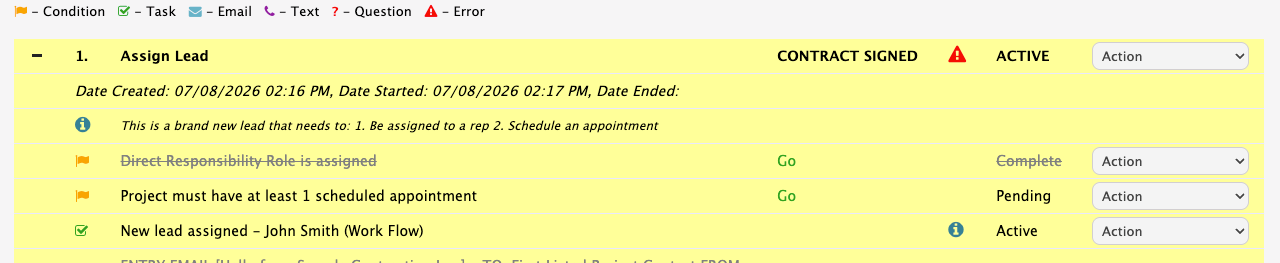
Tasks created by the Workflow are also listed under their milestone on the project's Workflow page (Workflow → Workflow in the project menu), marked with the green task icon. Each one has an Action menu: Edit Task, Close Task, Reopen Task once it is closed, Bypass Task, and Delete Task. The milestone's own Action menu adds Complete all Tasks. Some of these require extra permissions; see Workflow tasks below.
Dashboard widgets
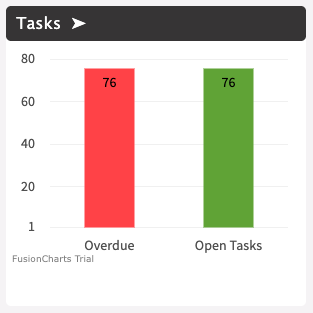
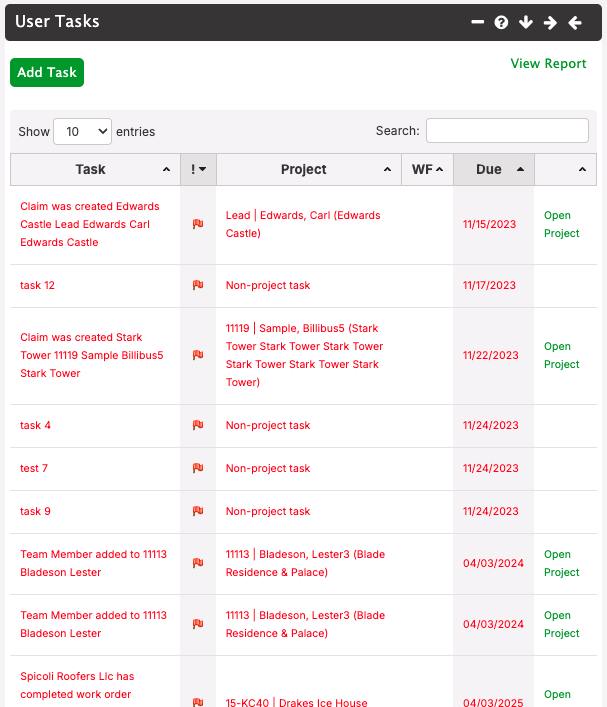
On My Dashboard (under Dashboards in the main menu), the Tasks widget charts your Overdue and Open Tasks counts; click its arrow to open the Tasks page. My Dashboard Old has a User Tasks widget instead, listing your open tasks with their project, workflow, and due date, plus an Add Task button and a View Report link to the full page.
Reminders
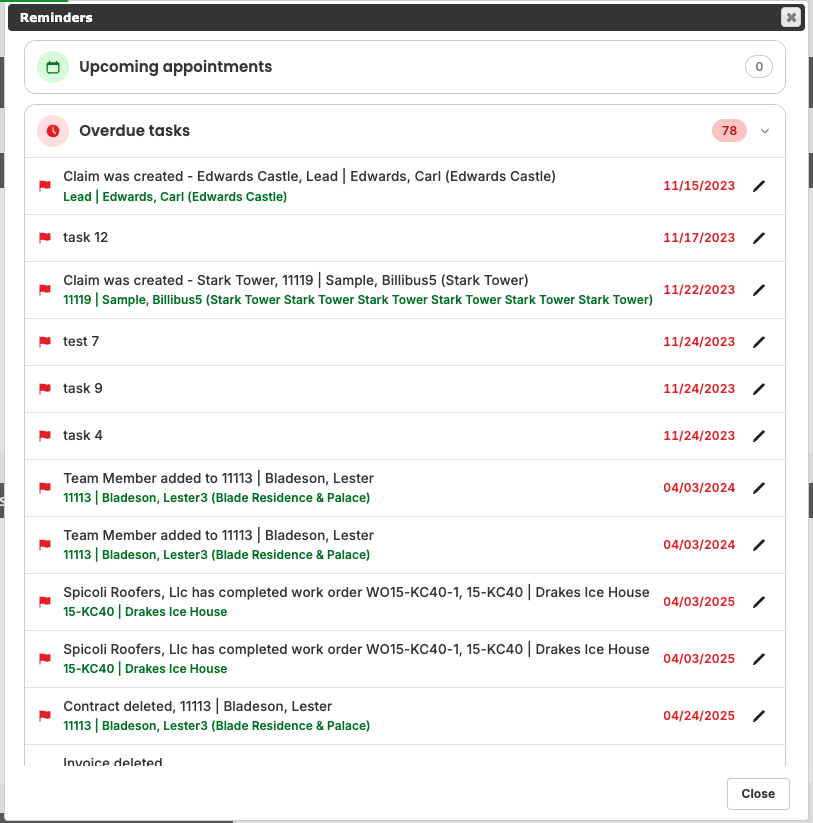
When Reminders are turned on for your user, a Reminders window opens when you land on your dashboard. It has an Overdue tasks section and a Due today section. Click the pencil on any row to open the task, or View all in My Tasks to go to the Tasks page.
The mobile app
Tasks are fully supported in the Contractors Cloud mobile app: you can see, create, update, and complete your tasks from the field.
Working a Task
Open any task to get the Edit Task dialog. The status badge at the top tells you whether it is Active, Overdue, or Completed, and the project bar shows which job it belongs to.
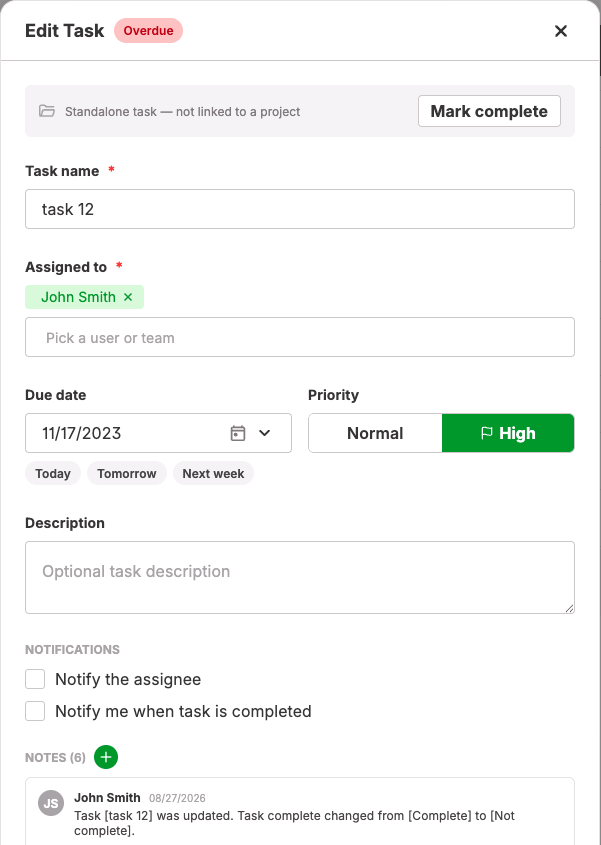
- Extend it. Change the Due date and Save. The change is logged as a task note automatically.
- Reassign it. Change Assigned to and Save. The new assignee is notified, and the reassignment is logged.
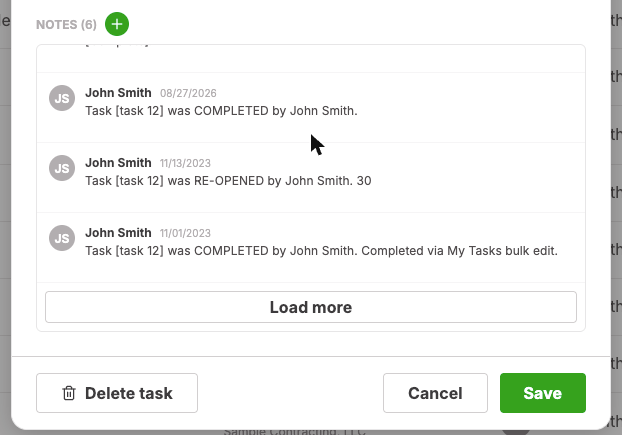
- Document it. Some tasks take days and several conversations. Click the green + next to NOTES to record what happened along the way, so whoever picks it up next has the story.
- Complete it. Click Mark complete. The task moves to Completed, the creator is notified if they asked to be, and if the task belongs to a Workflow the milestone is re-checked immediately.
- Reopen it. A completed task shows Reopen task instead. Workflow tasks are the exception; see below.
- Delete it. Click Delete task and confirm. This cannot be undone; prefer Mark complete when the work was actually done.
For tasks on a project, every create, edit, completion, and deletion is also written to the project's notes, so the project history shows the task activity alongside everything else.
Notifications
Task notifications arrive in the app's notification bell and as push notifications on the mobile app. The Notify the assignee and Notify me when task is completed options control who receives them. Today these are in-app and push only; email and text message delivery for task notifications is coming in the near future. The one exception is a Workflow task whose template is set to Send Email when Created: that task also emails its recipient from the project's email inbox the moment it is created.
Team tasks
Turn on Allow team tasks under Company Settings → General Parameters to assign tasks to a team instead of a single person. Every active member of the team sees the task, and any member can work it. When one member marks it complete, it is complete for everyone. Use the Team tasks quick view, or the My team and Only team tasks filters, to find them.
Workflow tasks
Tasks created by a project Workflow behave a little differently, because the milestone depends on them.
- They gate the milestone. A Workflow Task must be completed or bypassed before its milestone can complete and the Workflow can move on.
- Completing one re-checks the Workflow. Mark it complete anywhere and the milestone is re-evaluated right away.
- Reopen from the Workflow page. A completed Workflow task cannot be reopened from the Edit Task dialog. Open the project's Workflow page and use Reopen Task in the task's Action menu instead. The dialog will tell you: "This task belongs to a project workflow — reopen it from the project's Workflow tab (Reopen Task)."
- Bypass instead of delete. Bypass Task on the Workflow page marks the milestone task as bypassed, removes the task, and lets the milestone proceed. It requires Executive access or override authority. Deleting a Workflow task while its milestone is still active does not help: the Workflow simply creates it again.
- Cancelled projects. When a project is cancelled, the Task Delete option on the cancel form decides what happens to its tasks. DELETE TASKS removes them. Do Not Delete Tasks, the default, keeps them but puts them on hold, so they drop out of Reminders and the overdue counts until the project is reactivated.
Permissions
- Every user can create tasks and edit the tasks they can see.
- Users whose access is limited to their own projects and accounts see only tasks assigned to them or to an active team they belong to.
- Bypass Task on the Workflow page requires Executive access or override authority. Delete Task there requires Executive access or milestone delete authority.
- Allow team tasks (Company Settings → General Parameters) must be on before anyone can assign a task to a team.
Troubleshooting
Save fails with "The due at field is required." The task has no due date. Set a Due date and save again.
A completed task has no Reopen button. It is a Workflow task. Reopen it from the project's Workflow page with Reopen Task.
I deleted a task and it came back. It was a Workflow task and its milestone is still active, so the Workflow recreated it. Use Close Task if the work is done, or Bypass Task if it does not apply.
The assignee says they were never emailed. Task notifications are delivered in the app and by push notification today; email and text delivery is coming. Ask them to check the notification bell. Workflow tasks email only when their template is set to Send Email when Created.
I cannot pick a team in Assigned to. Allow team tasks is off. An administrator can turn it on under Company Settings → General Parameters.
A task shows on the Tasks page but not in Reminders. Reminders only list tasks that are overdue or due today. If the task's project was cancelled with Do Not Delete Tasks, the task is on hold and stays out of Reminders until the project is reactivated.
A Notification fired but no task appeared. Open the Notification under Company Settings → Custom Alerts and check that Create Task is ticked under Channels and that a Recipient is set.