
Estimate Details
These are the main settings and high level details for the Estimate.
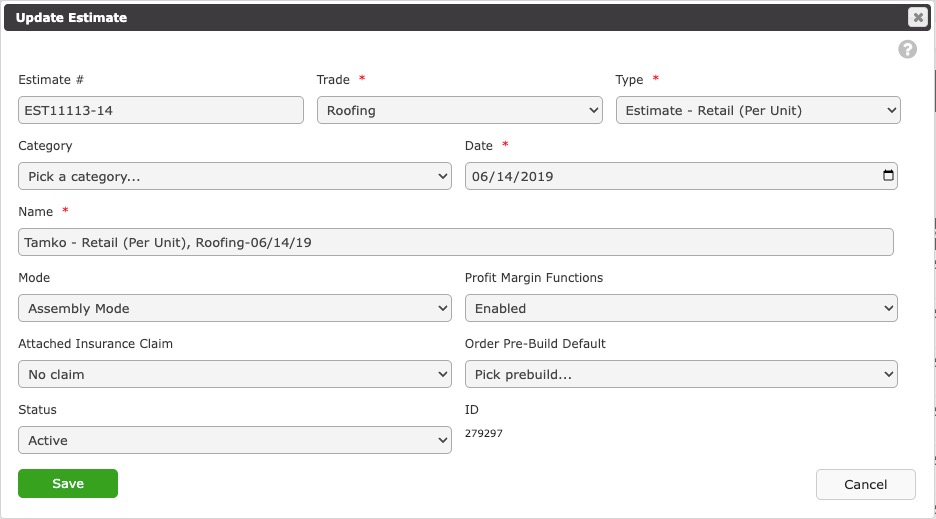
Estimate #
The number of the Estimate, which is typically related to the job number.
Trade (required)
These are one of your Tenant Trades.
Type (required)
This defines how the estimate is built and more specifically, what database items will be available to use.
- Installed Materials - Installed materials as defined by actual materials that get ordered and labor used to installed the materials.
- Estimate Retail (Per Unit) - This type is used for sales oriented estimating where an item is bundled with both material and labor. These items are structured more to provide quick estimates rather than quick orders.
- Estimate - Insurance - This can be bundled items, similar to Estimate Retail (Per Unit), but is dedicated to Insurance Proceeds type items.
Category (optional)
These are optional categories that define a group of Estimates. Estimate Categories are set up in Company Settings, Estimate Customization (permission required).
Date (required)
Typically the creation date of the Estimate.
Name (required)
This is the friendly name of the Estimate. This is automatically suggested upon Estimate creation, but can be altered if desired.
Mode (required)
This defines how the estimate is built and more specifically, what database items will be available to use.
- Line Item Mode - This is a simple mode where materials and labor are defined each by an Estimate Item. Think of this as a "time and material" estimate.
- Material with Labor Mode - This mode defines materials only and labor costs are populated from the Labor Cost field within Company Event Price Lists.
- Assembly Mode - This mode allows labor costs, or Components, to be defined within the Estimate Item. Components can automatically be created using Material Lists in combination with Material Automations and Material Conversions.
Profit Margin Functions (required)
If enabled, profit margins can be added to Estimate Items. Default profit margins are set up in Company Settings, Estimate Customization (permission required).
Attached Insurance Claim (optional)
This attaches a previously created Insurance Claim to the Estimate. When selected, the Claim information will be printed on the Estimate print outs.
Order Pre-Build Default (optional)
An Order Pre-Build is a bridge between your Estimate and automatically generated Work and Material Orders and are primarily used in Assembly Mode. This default automatically sets the Pre-Build field for each newly created Estimate Item Component.
Status (required)
Set the Estimate to Inactive if it is considered void. Only Active Estimates can be used in proposals.
ID
The Contractors Cloud ID for the Estimate.